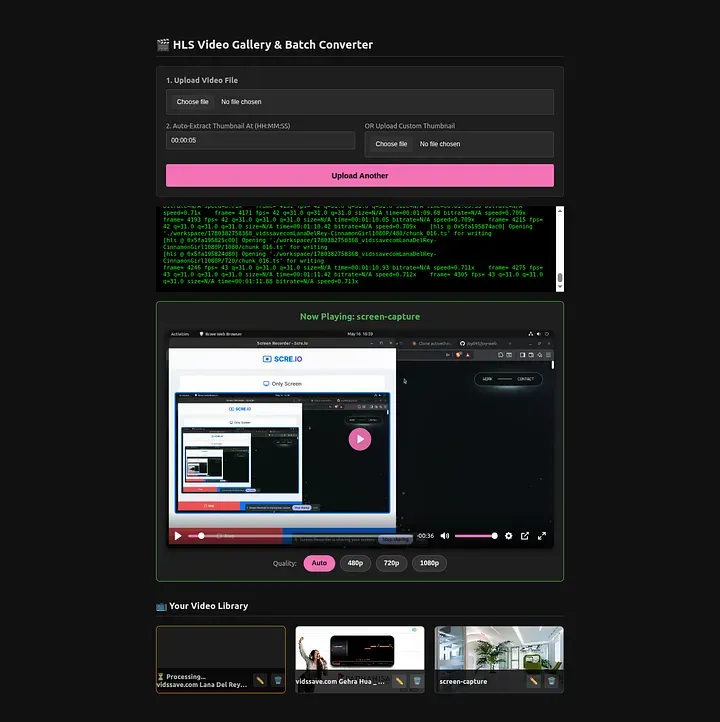
Moderne Videoanwendungen benötigen mehr als nur einfache Datei-Uploads. Sie erfordern automatisierte Transkodierung, adaptives Streaming, Thumbnail-Generierung und eine skalierbare Verarbeitungspipeline.
Um diesen Bereich zu erkunden, habe ich eine selbstgehostete Videoverarbeitungsplattform mit Bun und FFmpeg entwickelt, die hochgeladene Videos in produktionsfertige HLS-Streams umwandelt.
Funktionsweise des Projekts:
Die Plattform ermöglicht Nutzern:
Videodateien hochladen
Videos automatisch im Hintergrund verarbeiten
Mehrere Videoauflösungen generieren
Adaptive HLS-Playlists erstellen
Thumbnails generieren
Vorschaubilder generieren
VTT-Dateien für die Video-Scrubbing-Vorschau generieren
Verarbeitungsstatus verfolgen
Nach der Verarbeitung werden die Videos als Streams mit adaptiver Bitrate bereitgestellt, die auf verschiedenen Geräten und unter verschiedenen Netzwerkbedingungen effizient wiedergegeben werden können.
Technologie-Stack
Backend
Bun
TypeScript
SQLite
Videoverarbeitung
FFmpeg
FFprobe
Bereitstellung
Docker
Docker Compose
Verarbeitungspipeline
Beim Hochladen eines Videos:
1. Videoanalyse
FFprobe extrahiert Metadaten wie:
Dauer
Auflösung
Codec-Informationen
Bildrate
2. Thumbnail-Generierung
Das System generiert Vorschaubilder aus dem Quellvideo.
3. Multi-Bitrate-Transkodierung
Das Video wird in mehrere Auflösungen konvertiert:
1080p
720p
480p
Jeder Stream wird mit H.264 und AAC kodiert.
4. HLS-Paketierung
FFmpeg erstellt:
.m3u8-Playlists
.ts-Segmente
Für adaptives Streaming wird eine Master-Playlist generiert.
Beispiel:
1080/playlist.m3u8
720/playlist.m3u8
480/playlist.m3u8
master.m3u8
5. Vorschau-Assets
Zusätzliche Assets werden generiert:
Thumbnail-Sprites
WebVTT-Timeline-Vorschauen
Diese verbessern die Benutzerfreundlichkeit beim Durchsuchen von Videos.
Warum HLS?
HLS (HTTP Live Streaming) bietet mehrere Vorteile:
Adaptives Bitraten-Streaming
Bessere Wiedergabe in langsamen Netzwerken
Reduzierte Pufferung
Breite Browser- und Geräteunterstützung
CDN-freundliche Architektur
Anstatt eine einzelne große Videodatei zu streamen, wechselt der Player dynamisch zwischen verschiedenen Qualitätsstufen, abhängig von den Netzwerkbedingungen.
Aktuelle Funktionen
✅ Video-Upload
✅ FFmpeg-Verarbeitung
✅ Transkodierung mehrerer Auflösungen
✅ HLS-Streaming
✅ Thumbnail-Generierung
✅ Vorschau-Sprite-Generierung
✅ WebVTT-Timeline-Vorschau
✅ SQLite-Speicherung
✅ Docker-Bereitstellung
Fazit
Dieses Projekt demonstriert, wie ein schlanker Stack aus Bun, FFmpeg, SQLite und Docker genutzt werden kann, um eine vollständige Videoverarbeitungspipeline zu erstellen, die adaptive HLS-Streams und Video-Vorschau-Assets generiert.
Es bietet eine solide Grundlage für die Entwicklung von Videoplattformen, Online-Lernsystemen, Mediatheken oder jeder Anwendung, die eine effiziente Videobereitstellung in großem Umfang erfordert.
Projektlink: github.com/joy095/ffmpeg-video-stream
Portfolio: joykarmakar.vercel.app
LinkedIn: linkedin.com/in/joy-karmakar-cooch-behar